Rarecam brings film-like capture and manual control to Android
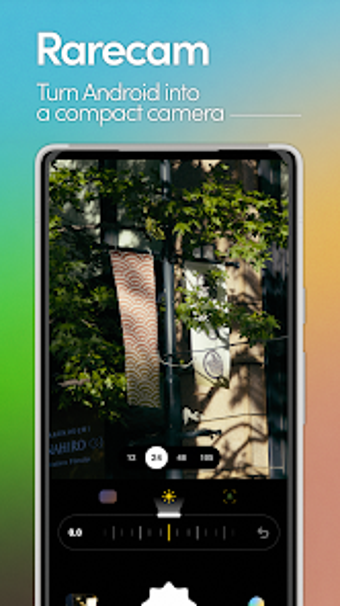
Rarecam, created by Yuto Kobayashi, is a photography app that aims to capture light without aggressive AI alteration, preserving natural texture and tone. The app offers real-time cinematic color profiles, manual controls for exposure, shutter, ISO, and Kelvin, plus STACK burst-stacking and uncompressed RAW (DNG) output. It targets photography enthusiasts and creators who prefer a film-like, privacy-first workflow and want deliverable images that match the live viewfinder rather than heavily processed smartphone outputs.

Unlock your creativity with Adobe Stock
Get 10 images or 1 video with a free trial
What is Rarecam used for?
You use Rarecam to capture images that retain organic texture and cinematic color, rather than the sharpened, artificially bright results typical of modern camera apps. The app positions itself as an alternative to heavy AI post-processing by providing real-time cinematic color profiles and manual dials for Exposure (EV), Shutter Speed, ISO, Kelvin, and Focus. That combination keeps what you see in the viewfinder close to the final photo, useful when you need faithful captures for editorial or artistic work.
What photo formats and processing does it support?
Rarecam saves uncompressed RAW (DNG) files, which lets you perform deep edits using full sensor data after capture. Processing happens on-device, so all rendering and stacking operate locally without external servers, delivering a privacy-first pipeline. For low-light needs the app includes STACK mode, a burst-stacking routine that suppresses noise while preserving fine detail. The practical effect is export-ready RAW for serious post-processing and cleaner JPEGs out of the app when you prefer immediate images.
Is Rarecam better for beginners or experienced creators?
You will find the app leans toward photographers who want manual control and film-like results. Pro manual controls and DNG support suit experienced users and creators who perform external editing, while the live cinematic color science helps less technical users get a consistent aesthetic without relying on automatic sharpening. The developer’s focus on avoiding AI over-sharpening means you accept a more natural look rather than aggressive enhancement, a trade-off that rewards compositional care and post-work.
Rarecam is a practical gateway to cinematic mobile photography
If you want images that mimic film grain and color, Rarecam gives you tools and a privacy-first pipeline that preserve what you compose in the viewfinder. It is a strong choice for creators who value manual exposure control and RAW output. Expect a deliberate capture workflow that favors authentic texture over automated processing, making it a good entry point if you are moving from casual phone snaps toward more intentional photography.